Library of MatchesUnspecified~ Maternal: ~ Paternal: ~ painted
Welcome! This is a map by Cody Ely, a genetic genealogist, featuring real examples of matches from a wide variety of relationships. You can use this to help predict your relationship to unknown matches, or as a resource to learn more about different relationships by seeing the shared segments. All matches have been genealogically verified by Cody, who will continue to add matches and manage the Library as time goes on. For more about Cody, please like and follow his Facebook page at facebook.com/codyelygenealogy
Instructions
- Each group in the key on the right is a set of shared segments between two people with a known relationship (a 'match'). You can find the known relationship (e.g. Paternal Half Siblings) in the group name.
- Use the key to find matches that are similar to your unknown match, or to find examples of a specific relationship type you are interested in seeing. The key is sorted by shared cM.
- If you like, click 'NONE' on the key to hide all of the matches, then click on the appropriate colored square to the left of the match you are interested in to make it visible.
- Search the key at the bottom right by typing the relationship abbreviation into the 'Search groups' field. For example, type '1C1R' for first cousins once removed.
- Matches in the key with the same letter in parenthesis can be displayed at the same time to visualize recombination and other helpful simulations.
- Grandparent and great-grandparent matches without a SNP count have been inferred, but are nonetheless accurate.
- Whether your matches are paternal or maternal does not affect the validity of using this tool.
However, please note that example grandparent and half sibling matches have been specifically labeled as paternal or maternal.
- According to Cody and others, these relationships have different segment patterns depending on if they are paternal or maternal.
- While you will share different segments and different amounts of DNA with your matches, this library of examples will hopefully help you in your research.
The process of painting a match involves some copying and pasting of data. While you can do this on a touch device, you might prefer to use a desktop browser!
Create a new chromosome map
A new chromosome map is a set of blank chromosomes that represent an individual who has taken an autosomal DNA test.
When you have a DNA match, you will match on particular segments. The aim of this site is to provide a platform that lets you take this match segment data and use it to 'paint' your chromosomes (or those of the person who took the DNA test!), adding as much information as possible so that you can use this info to help trace future matches.

You can choose whichever colours you like. For known connections, it can be a good idea to assign a distinct colour to each of the four grandparents, and then use variations of these. For more information on how to set up a chromosome map, click the Settings cog at the top left and then click on 'Tour of this page'.
Y and mitochondrial DNA
This map has the sex of the test taker set to 'Unspecified'. If you would like to restrict display of the Y-chromosome according to sex, please set this as male or female by clicking on unspecified to the right of the name at the top left of the page.
All fields are optional Blog post about this feature
(e.g. R-M269 as opposed to R1b1a1b) Normally in the form T12345
(e.g. a string beginning with a letter) Normally in the form T12345
Help with this page
Welcome. Here's an overview of some of the features of the chromosome map page.
Advanced features
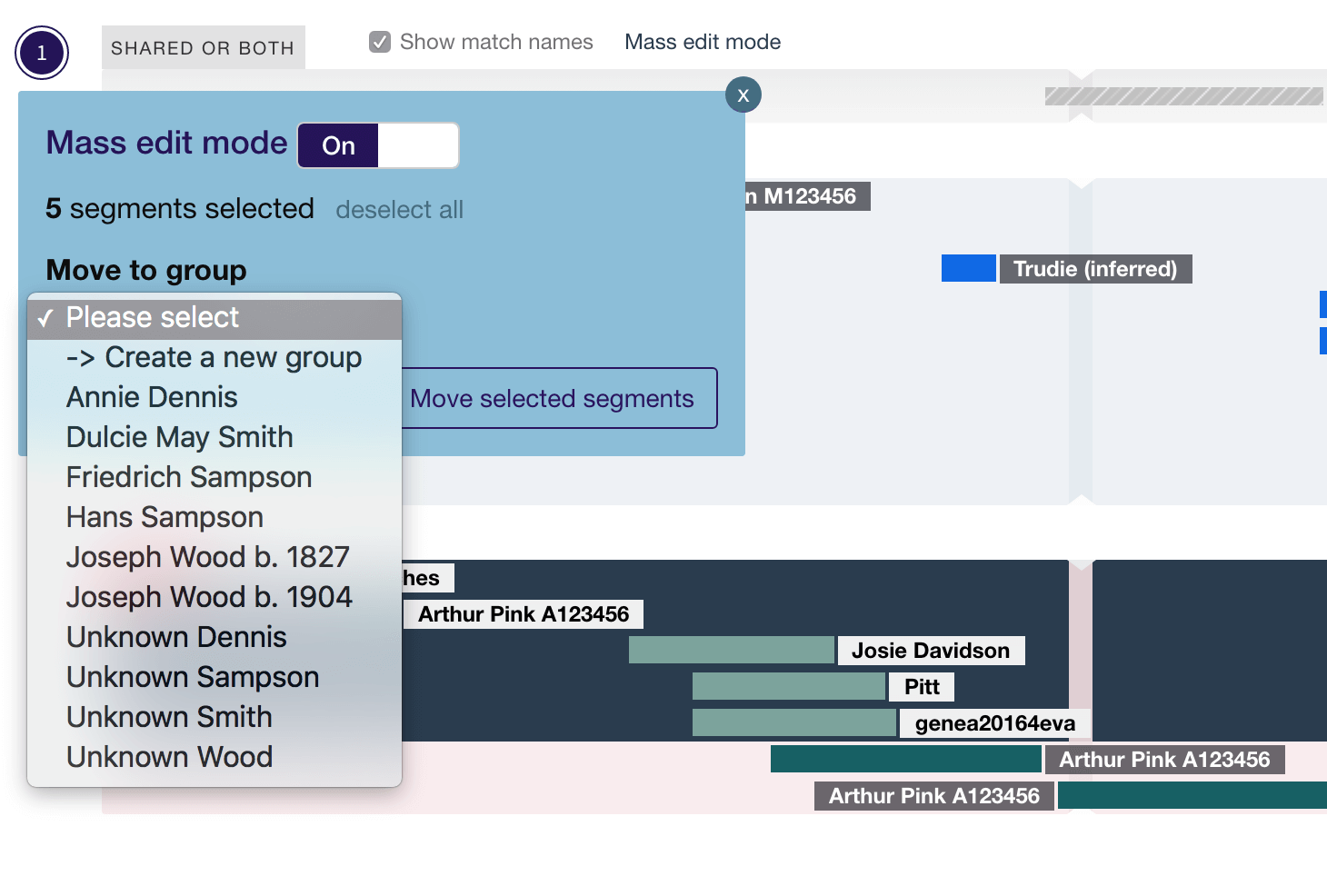
- Mass edit mode If you expand a chromosome or go into the group or match view, you can turn this on. It will then let you draw a box or click on segments to select them (hold down CTRL/CMD to select multiple segments) and choose a group/create a new group to move them to.
- Improved bulk imports Bulk imports from 23andme now take account of the Maternal/Paternal buckets, and there is an enhanced interface for the ftDNA maternal/paternal bucket tool allowing you to sort your matches
- More detailed match list The 'All matches' report under 'reports' now lists the total cM, number of segments, and average cM shared.
- Improved navigation The match overlay now includes a navigation link to get back to where you were (for example, if you click on a match name in the All matches report, the match overlay will contain a link back to All matches.
Controls
At the top left of your profile, just above the first chromosome pair, you'll see three buttons.
When you hover over a button, a tooltip appears explaining what it does. Click a button to expand/contract the chromosomes, view settings, or perform a search.

Expand/contract all
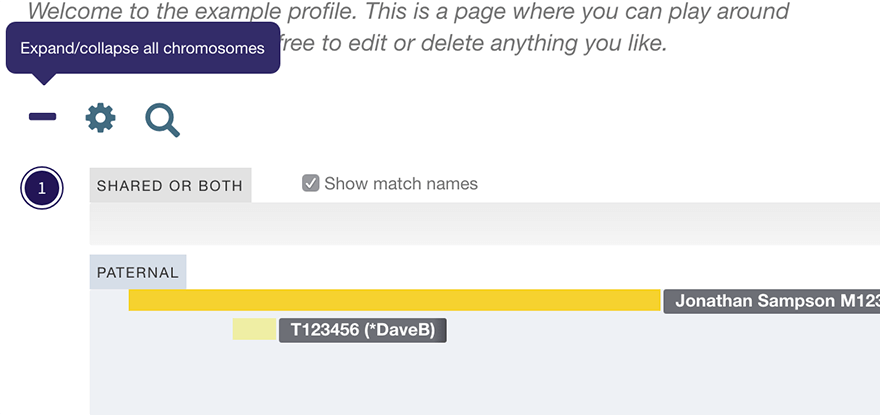
- The '+' icon expands all your chromosomes at once.
- After you click this button, it will transform into a '-' that you can click in order to minimize them again. You can still expand and contract chromosomes individually.
- After you expand all chromosomes, match names will show automatically. You can toggle this using the checkbox that appears above each expanded chromosome.
Search by match name
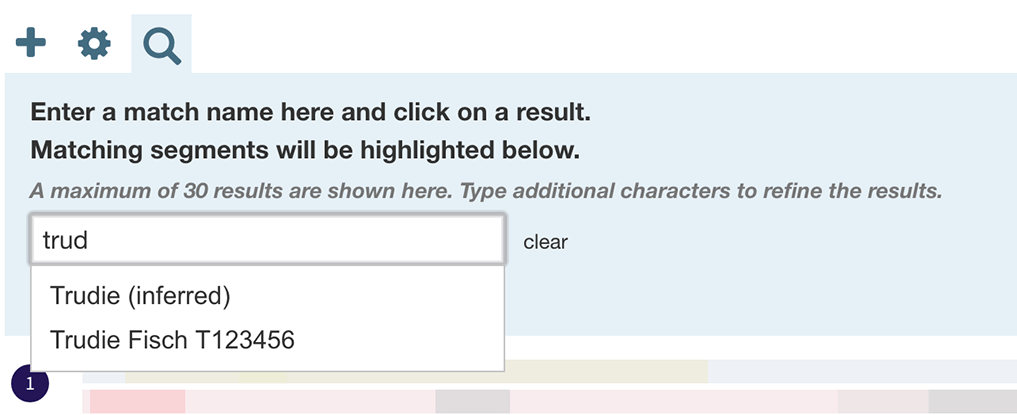
Your chromosome map has an auto-complete search.
- Start typing a match name, and matching names will appear in a dropdown
- Click a name in the dropdown
- All segments will be paled out and the matching segments will be highlighted. The first matching segment will have hover state expanded.
- Click 'clear' or the 'X' icon on the search panel to clear the search and restore the segments to their normal state.
Settings
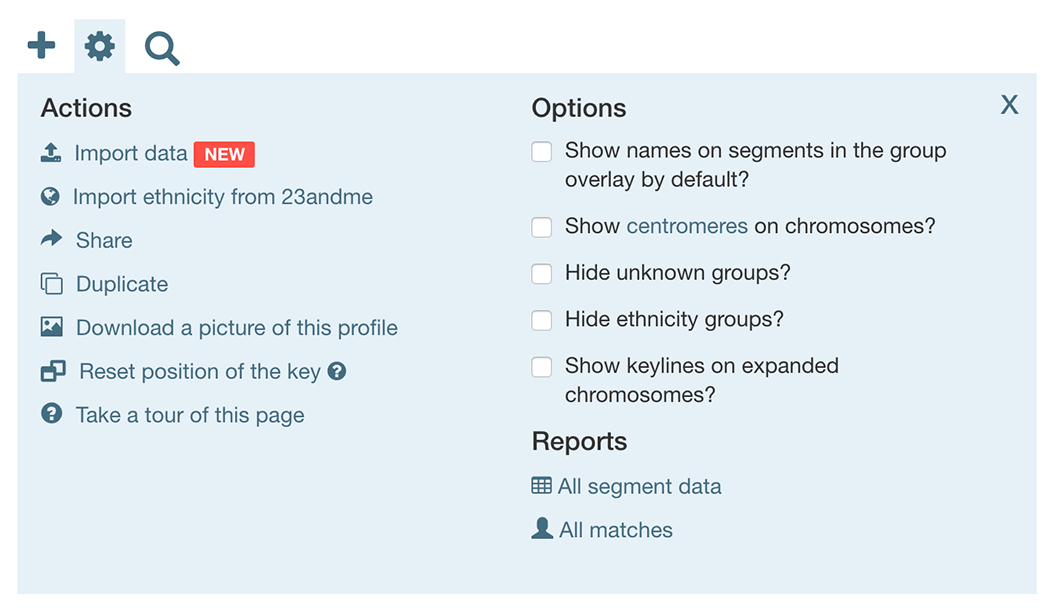
Here you'll find actions:
- Share, Duplicate, Download a picture of this profile, Take a tour of this page, Import ancestry composition from 23andme, All segment data
In addition, the following features are available:
- Actions: Import data (for subscribers only; see below), import 23andme ancestry composition data, reset key position
- Options: Show match names in the group overlay, Show centromeres on chromosomes, Show keylines on expanded chromosomes, Hide unknown groups, Hide ancestry composition groups
- Reports: All matches, All segment data
Any options you select will be saved in your browser's local storage and will persist until you reset your browser or empty its cache.
Import Function
As well as adding individual matches, you can bulk import your match segments from a comma-separated-values (CSV) file.
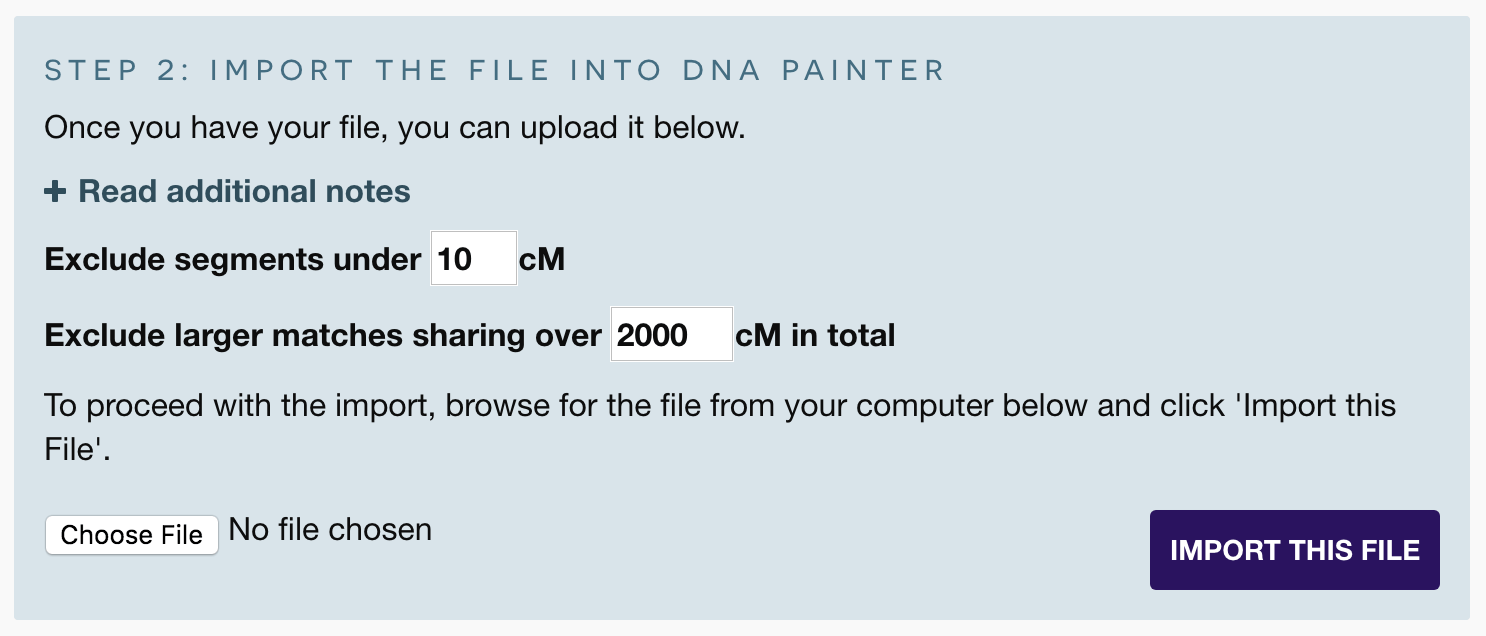
The CSV file can be directly from your testing company (e.g. the CSV file of segment data provided by MyHeritage, FamilyTreeDNA or 23andme) or custom file (a template is provided in the import overlay).
This opens up a number of possibilities:
- Bulk import of all matches from a testing company in order to view patterns and chromosome coverage
- Adjust the thresholds for minimum and maximum cM values in order to import specific ranges
- Assemble profiles offline and import directly into DNA Painter
- Restore exported DNA Painter profiles
Please note: to use the import functionality, you need to subscriber.
Match detail
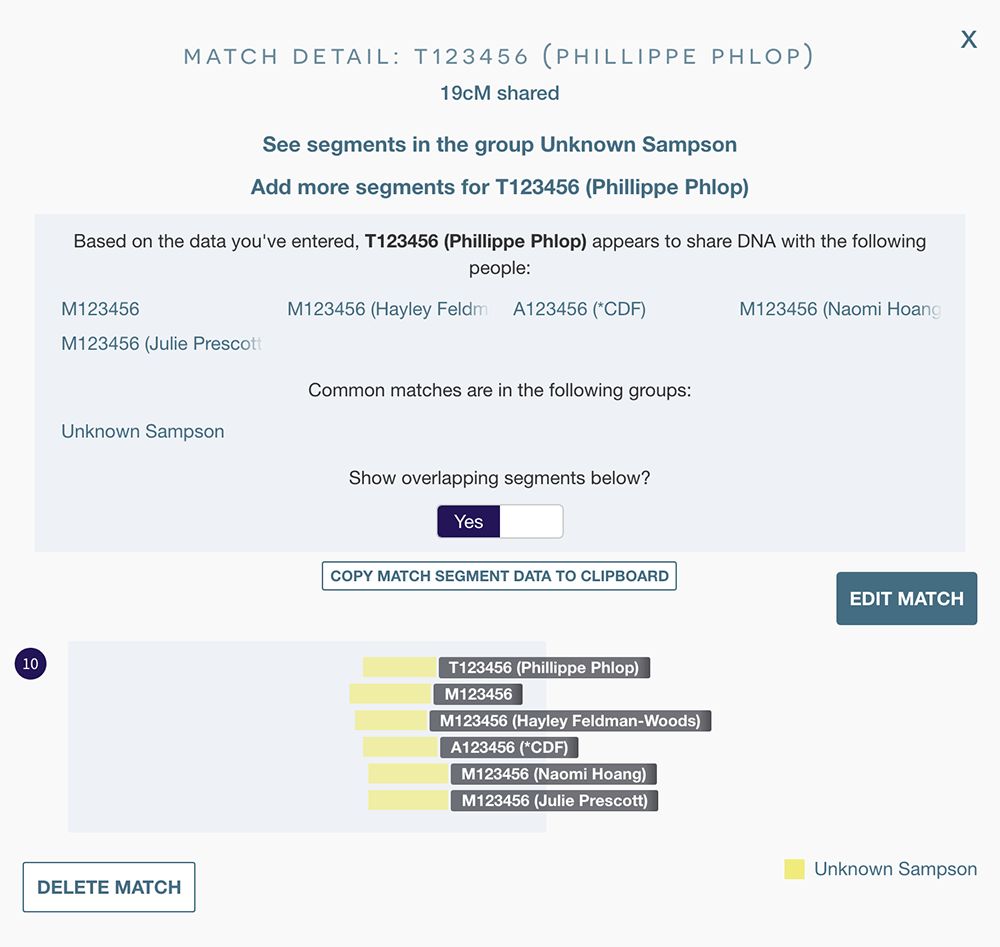
You can reach the match overlay view by clicking on any segment and clicking 'view match', by hovering over the match name in the 'All segment data' overlay, or by clicking on the match name in the group overlay and clicking 'view or edit match'.
Here you can:
- Click a button to copy all segments for this match to the clipboard
- A list of all matches who appear to share DNA with this match based the data you've entered
- A switch allowing you to view all overlapping segments within the match overlay
- The switch and list of matches will only appear if there are overlapping segments
New functionality
- Multiple segment deletion. In the 'all segment data' view, you can click 'mark for deletion', and a column will appear with checkboxes. There's also a checkbox in the table header to select all visible segments. You can use this to filter the table for the things you want to delete and then select them all. Once you click 'Delete segments', the site will say how many segments you are deleting and remind you that this action can't be undone. If you confirm the deletion, the segments will be deleted and the 'all segment data' window will reload.
- Search the key - if you have a lot of groups it can be hard to find the one you're looking for. If you have more than 30 groups, a search box appears so that you can filter them to find the one you want more quickly.
Subscription
The site is free, but a subscription is required for serious users who would like to use the new bulk import functionality and/or have multiple profiles.
Match Detail:
across
< Back to this match
Add more segments for this match
Based on the data you've entered, appears to share DNA with the following people:
Some of these people are in a group that is not specifically maternal or paternal, and may therefore not be related on the same chromosome. Since your match includes segments that you haven't placed on a specific maternal or paternal chromosome, these people may not be related on the same chromosome. If possible, compare these people directly (e.g. via a one-to-one comparison on Gedmatch, or in MyHeritage's chromosome browser) to clarify whether or not they actually match each other.
Common matches are in the following groups:
Show overlapping segments below?
1
Group Detail
Drop this match into a new group to move it
New Group for match
1
To merge into another group, select the group and click 'Merge'
MergePlease note: if you are merging large groups this may take a while
All Matches
| Name | Side | Total cM shared | Number of segments | Largest | Average segment length | Segs ≥20cM | Notes |
|---|
Data Report
| Chr | Start | End | cM | SNPs | Match | Confidence | Group | Side | Notes | Colour | Ancestor |
|---|
Inline segment editor
Click on any cell to edit its contents
Your edits will be saved when you close this overlay. You can revert any changes by refreshing the page.
segment will be deleted. This action can not be undone.
Please confirm you'd like to go ahead.
Transform Groups
Click the button below to make every group in this map
This action cannot be undone, so if you're in any doubt, please duplicate or back up this map before proceeding.
Remove duplicate segments
This tool will identify groups of segments where the chromosome, match name and start position are identical. It will then choose one to retain:
- If a segment is in a group that has been identified as maternal or paternal and other duplicate copies have not, it will retain the identified segment
- If one copy is in a custom named group and others are in imported 'Matches' groups, the segment in the custom named group will be retained
All notes will be compiled in the retained segment.
Caution: If you have used 'Copy Segment' to duplicate any segments, this tool will remove them if the match name hasn't changed. This functionality is still in beta phase and should be used with caution. Please duplicate this map before proceeding!
Fuzzy duplicates are those where the name and chromosome are the same, and the start position is within 2,500,000 base pairs Remove duplicate segmentsDuplicate
To make a copy of this chromosome map, please click the button below.
You will then be taken to the new duplicated map.
Duplicate this chromosome mapThe key (aka legend) in DNA Painter
The key lists all ancestors and groups of segments. You can make the following customisations: Please note: these functions may not all work on mobile/touch devices.
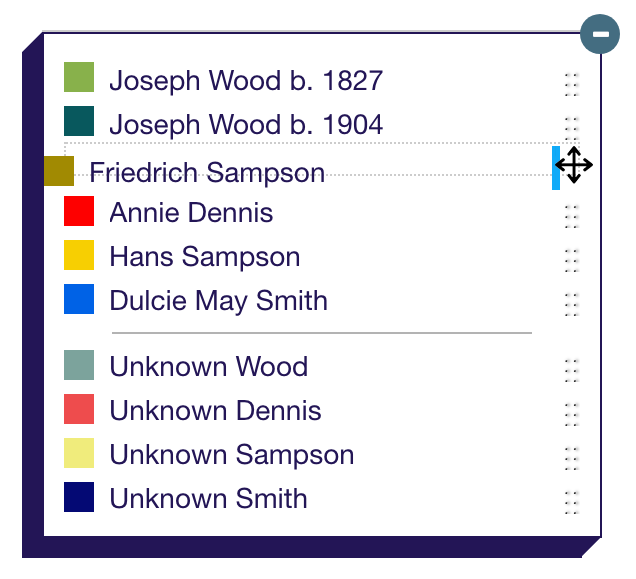
If you click and drag on the 'dotted' icon to the right of each item in the key, you can pick it up and drag it into a new position.
- For example, you could move the group at the top to below the third group.
- This will have the effect of altering the layer order - so if segments from this group overlap with other segments, those segments from the group that's higher in the key will show on top.
If you click on the coloured square to the left of an ancestor or group name, it will hide any segments in this group (or if you've already hidden them, it will show them).
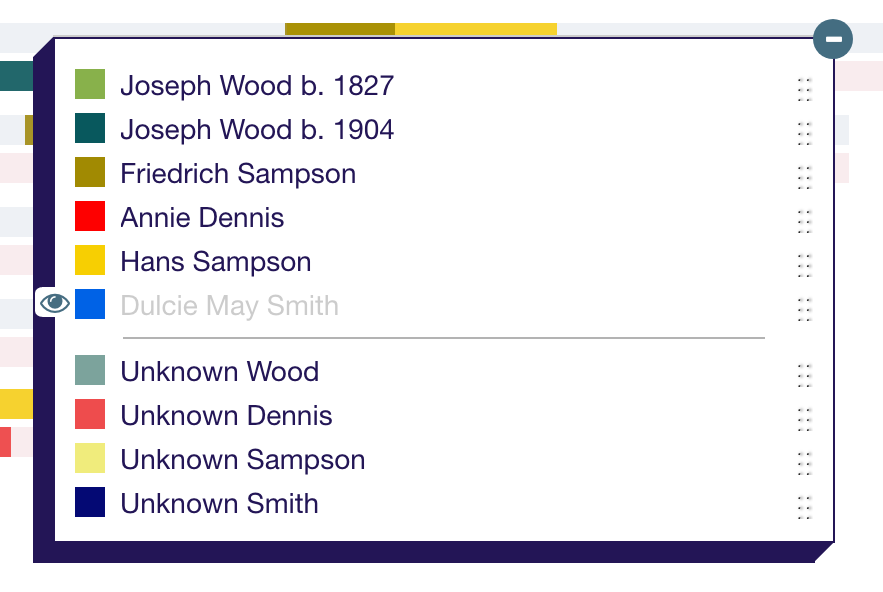
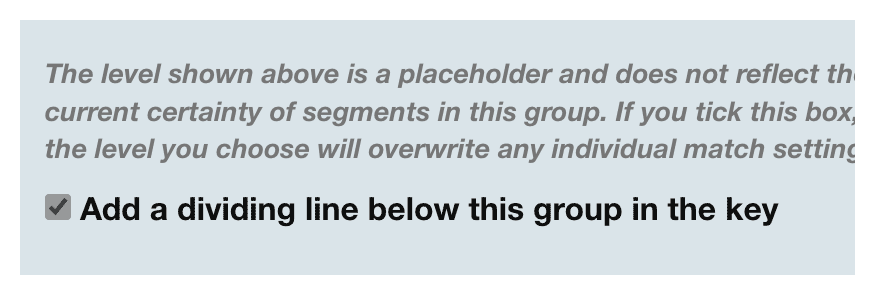
You can add a dividing line into your key by editing the group you want the line to appear under:
- Click on the group to bring up the overlay
- Click 'edit group,' check the box Add a dividing line below this group in the key, and then click 'save group'
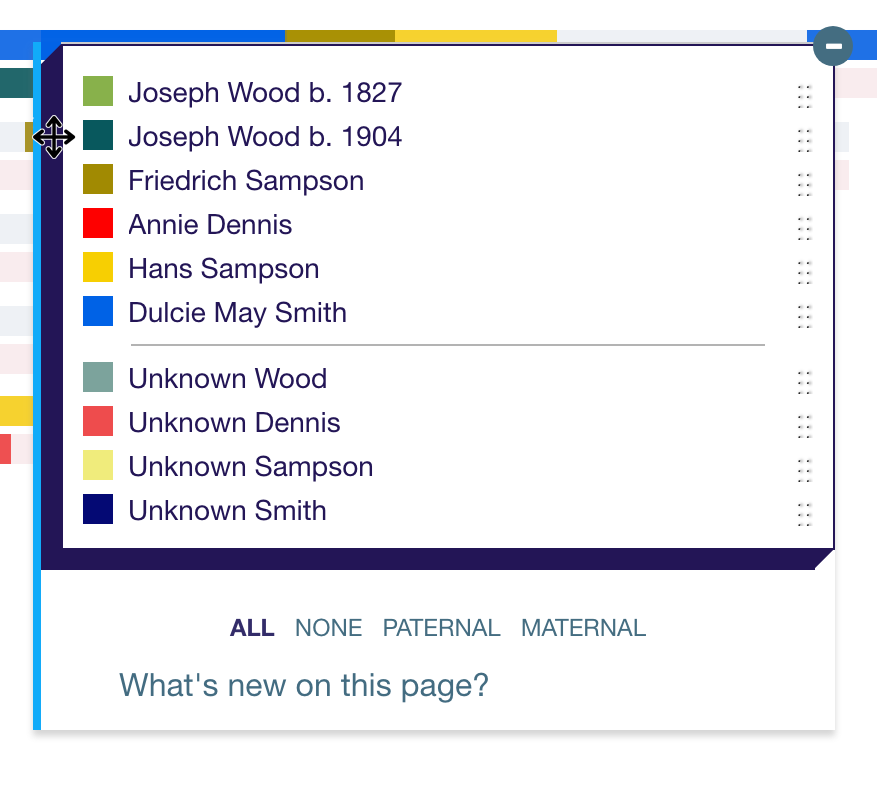
You can drag and drop the entire key by clicking on the dark area on the left of the key and dragging it into a new position.
- A bright blue border will appear on the left while the key is being dragged.
- Clicking 'Reset key position' in the settings panel will restore the key to its original position.
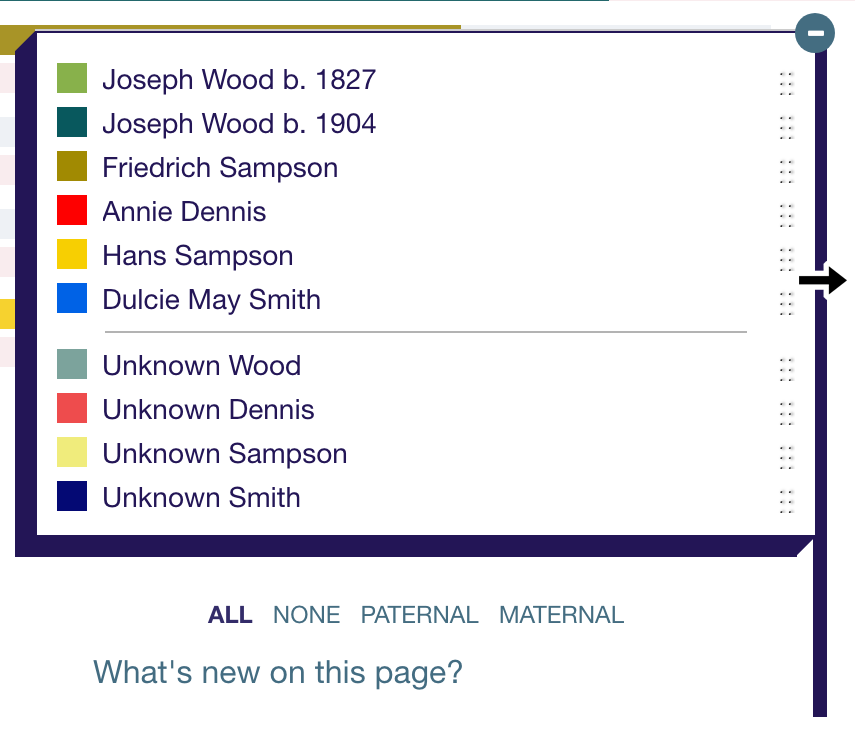
You can extend the width of the key by clicking and dragging on its right-hand edge.
- A dark blue border will appear on the right while the key is being widened.
Clicking 'NONE' below the key will hide all groups. Clicking 'PATERNAL' will show just paternal groups and clicking 'MATERNAL' will show just maternal ones.
Import
You can now import a spreadsheet of match segments into DNA Painter!
Before importing anything, it would make sense to duplicate this map first so you have a copy to go back to.
The import process uses a signficant amount of memory, and a desktop or laptop device is therefore suggested. If you're on a mobile or touch device, you might find that this freezes the site.
This map already contains segments.
Depending on how fast your computer is, importing additional segments might make it extremely slow.
If you have a large file, please consider importing it into a new map.
Step 1: Get your file
You can import the file of segment data that is provided by your DNA Testing company, or a DNA painter CSV file, and the site will recognize the format.
Important: this is not your raw DNA file; it's a file containing the coordinates for each segment you share with your matches. Please read on for more info!The instructions differ for each testing company. In all cases you will need to save the file to your computer as opposed to opening it.
- Family Tree DNA
The file is available via the button 'Download All Segments' in the ftDNA chromosome browser. The button is at the top right of the page above the list of matches. Please note that if you transferred to ftDNA, you'll need to unlock their chromosome browser before you can download your data.
- 23andme
Segment data is currently unavailable from 23andMe Read more
- MyHeritage
Bulk segment data is currently unavailable from MyHeritage This page will be updated once this feature is restored.
- Gedmatch
Gedmatch now provides a downloadable file of all segments via their 'Segment Search' report (please note: this is available to Gedmatch Tier 1 subscribers only).

This CSV can be imported directly into DNA Painter.
Or alternatively you can copy and paste the table of segments provided into a CSV format. To do this:
- Log into Gedmatch and run the Tier 1 matching segment search on the relevant kit.
- Once the results have loaded, copy and paste the entire page (CTRL/⌘-A to select, CTRL/⌘-C to copy, CTRL/⌘-V to paste) into a spreadsheet (or Google sheet)
- Delete the top 20 or so lines of the file, leaving the line with 'Kit, Chr, Start Position, End Position, cM, SNPs, Name, Sex, Email' as the header row
- Save this as a comma-separated-values (CSV) file and DNA Painter will recognise the format.
- Please note: the content of the 'Kit', 'Sex' and 'Email' fields will be appended to the notes on imported segments
Tip: if you have a parent tested and uploaded to Gedmatch, you can run the 'Phasing' tool to create separate kits of your maternal and paternal DNA. And if you then run the segment search using these phased kit numbers, you'll be able to import your maternal and paternal DNA separately and assign the matches to the correct chromosomes by editing the imported groups!
Importing a DNA painter map To download a CSV file from a DNA Painter map, visit 'All segment data' (click the settings cog icon above chromosome 1 and you'll find it under 'Reports') and click the '.csv file' link at the top left.
Or if you prefer, you can import a custom file of segments that you create. Files for import need to be in CSV format.
To create your own file, please use this template, with the header row intact.
The template is in comma-separated-values (CSV) format, and can be filled out in a spreadsheet programme (e.g. Excel or Google Docs), or in a text editor. For instructions on how to correctly open a CSV file in Microsoft Excel, please see this page. Please ensure the file you upload retains the CSV format. If you use a text editor, you will need to make sure you don't use commas in the data you enter in for each field.
Fields marked with an asterisk (*) are compulsory:
- Chr * This field should contain the chromosome number (it can be preceded by 'chr')
- Start * This field should contain the start position for the segment
- End * This field should contain the end position for the segment
- cM This field should contain the number of centimorgans shared
- SNPs This field should contain the number of SNPs in the segment
- Match This field should contain the name of the person with whom you share this segment (if not provided, this will appear as 'not specified').
- Confidence This field should contain a number between 1 and 4 that measures how confident you are in your identification of this match (1 is the lowest and 4 is the highest. Segments with a lower certainty level display in a more transparent shade) (if not provided, this will appear as '3').
- Group This field should contain the the name of the group into which you want this segment to be placed (if not provided, the segment will be put in a generic group named according to the filename).
- SideThis field should contain 'maternal' if you want to paint the segment on your maternal chromosome or 'paternal' if you want to paint it on your paternal chromosome, or 'both' if you are uncertain (if not specified, the group will be 'unknown or both').
- Notes This field should contain any notes you have on the segment.
- ColourThis field should contain a colour for the group. This can be a hex code or a named colour (if not specified, a colour will be chosen at random).
- AncestorThis is an optional column that you can add if you want to indicate if a group refers to a known ancestor as opposed to a general grouping of segments. Enter a value of 1 if the group is a known ancestor. (if not provided, the group will be set to 'not a known ancestor')
Note: 'Colour' is used only if you have specified a side or new group name for the first time. If you have multiple segments in a new group, the values for 'side', 'colour' and 'ancestor' from the first instance of that name will be used.
If you don't have data for a column/value, don't delete it - just leave it blank.
Step 2: Import the file into DNA Painter
Once you have your file, you can upload it below.
- Matches imported from an ftDNA/MyHeritage export will not be sorted into maternal or paternal (hence will not count towards the % completed). If you have access to the tests of known maternal or paternal relatives, you could use Bucketing tool to make separate files before importing.
- This process is likely to add a significant number of segments to your map - from the low hundreds to several thousand, depending on the number of matches you have. This is likely to slow your map down.
- By default, the site will exclude close matches with more than 1,800cM shared (raise this limit to include these). It will also exclude any matches you've uploaded before from this testing company, provided you leave the original name intact.
Bulk import of matches is a premium feature. To enable this feature in your account, please subscribe:
Subscribe to DNA Painter new match segments are overlaid below
You might have to scroll down to see them all.
Import complete!
No new segments found above your threshold of
new segments over (or with no cM value set) imported for ~ matches.
Note: If you retain the threshold and match names as imported, DNA Painter will automatically skip these matches when you next import the data. To force the importing of duplicates, uncheck the 'Skip matches that seem to have been imported already' option.
Ancestry composition import complete
segments imported in groups.
Your match has been painted
1
2
3
4
5
6
7
8
9
10
11
12
13
14
15
16
17
18
19
20
21
22
X
- Click 'Paint a new match' and paste in match data to start painting.
You can also click and drag on the top and left borders.
Change the group order by dragging the 'gripper' icon to the right of the group name
Widen the key by dragging on the right edge.